Browser Recorder vs Cursorful: A Free Cursorful Alternative
Cursorful charges $79 for commercial use, mic and camera. Browser Recorder is free. Here is how the two Chrome screen recorders actually compare.
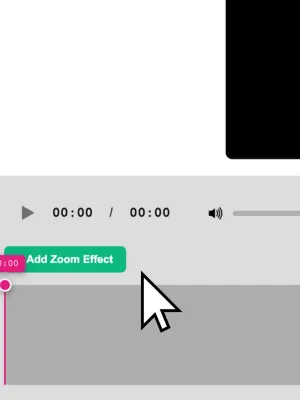
Cursorful and Browser Recorder solve the same problem from opposite ends. Both are browser extensions, both render locally, both skip the desktop app. The split is what you get without paying: Cursorful’s free tier is a non-commercial preview, and Browser Recorder’s free tier is the product.
If you are searching for a Cursorful alternative, you are probably looking at that $79 one-time upgrade and wondering whether the recorder you already have open covers it.
Browser Recorder vs Cursorful at a glance
| Browser Recorder | Cursorful | |
|---|---|---|
| Price | Free | Free (non-commercial), Pro $79 one-time |
| Commercial use | Included | Pro only |
| Microphone | Included | Pro only |
| Camera overlay | Included | Pro only |
| 4K export | Included | Pro only |
| Tab audio | Yes | Yes |
| Cursor zoom | Automatic, follows the cursor | Automatic, plus manual zoom editing |
| Backgrounds | Yes | Yes, custom and preset |
| AI captions | On-device Whisper, burned in | Not offered |
| Export formats | MP4, WebM, MOV, MKV | Video, multiple aspect ratios |
| Browsers | Chrome | Chrome, Edge, Brave |
| Where video is processed | Locally | Locally, optional cloud upload |
Cursorful pricing as published on cursorful.com in July 2026.
The paywall is in a different place
This is the whole comparison in one paragraph. Cursorful’s free tier records the browser and gives you the zoom editor, but a microphone, a camera overlay, 4K export and the right to use the video commercially all sit behind Pro. That is a defensible model for a polished tool, but the moment you narrate a demo for work, you are buying a licence.
Browser Recorder puts the microphone, tab audio, camera overlay, 4K export and commercial use in the free build. There is no Pro tier holding them.
For a solo creator making non-commercial clips, Cursorful’s free plan is genuinely usable. For anyone recording anything for a job, the free plans are not comparable.
Zoom: automatic versus directed
Cursorful’s identity is cursor zoom. Clicks trigger zooms and pans, and its editor lets you change each zoom’s position, depth and timing after the fact. If your videos live or die on that motion (product launch clips, marketing demos, anything you would post to X), Cursorful gives you finer control than we do.
Browser Recorder has smart zoom that follows the cursor automatically, alongside trim and cut, backgrounds, and the export options above. It gets a tutorial or a walkthrough looking sharp without direction. It does not give you a per-zoom keyframe editor.
That is the clearest honest tradeoff between the two tools, and it should drive the decision more than price does if motion design is the deliverable.
Captions no one has to type
Browser Recorder transcribes speech on-device with Whisper and burns the captions into the exported video. Nothing is uploaded to a transcription service, and there is no per-minute cost, because the model runs in your browser.
Cursorful does not offer captions. For tutorials, support answers and anything watched with the sound off, that is a full step of the workflow you would otherwise do in another tool.
Audio and sources
Both recorders capture the tab, a window, or the whole screen. Browser Recorder treats tab audio and microphone as independent switches, so you can mix a page’s own sound with narration, or record either alone, using the tab recording guide walks through the settings.
Cursorful captures tab audio on the free plan, but the microphone is a Pro feature, so narrated recordings are the point where the free tier stops.
Where Cursorful is the better pick
- You are not on Chrome. Cursorful also runs on Edge and Brave. Browser
Recorder is Chrome-only, and Chrome blocks extensions from capturing
chrome://pages. - Zoom choreography matters more than budget. Manual control over every zoom’s position, depth and timing is Cursorful’s core strength.
- You want a cloud copy. Cursorful offers optional upload to its own cloud; Browser Recorder has no cloud at all, by design.
- You want to pay once and stop thinking about it. $79 once is not a subscription, and for a marketing team shipping demo videos weekly it is cheap.
Where Browser Recorder wins
- Commercial use costs nothing. No licence to buy before you record for work.
- Narration is free. Microphone and camera overlay are in the free build.
- Captions are built in. On-device, burned into the export, no extra tool.
- 4K export is free. No tier gate on quality.
- Recordings never leave the device. All processing and storage stay local, which is the argument we made in full in how to record screen with audio in the browser.
Frequently asked questions
Is there a free Cursorful alternative for commercial work? Yes. Browser Recorder is free for commercial use, including microphone, camera overlay and 4K export.
Does Browser Recorder do cursor zoom like Cursorful? It has smart zoom that follows the cursor automatically. It does not offer per-zoom manual editing of position, depth and timing the way Cursorful does.
Do either of them upload my recordings? Cursorful renders locally with an optional cloud upload. Browser Recorder renders locally with no cloud option, so the file goes to your downloads folder.
Which exports better quality? Both reach 4K. Cursorful gates 4K behind Pro; Browser Recorder does not.
Can I run both? Yes. They are separate Chrome extensions and do not conflict. Reaching for the free one first and paying only if you hit its limits is a reasonable strategy.
The short version
Cursorful is a zoom-motion specialist with a paid licence for anything professional. Browser Recorder is a full free recorder with mic, camera, 4K, captions and commercial use, plus automatic rather than hand-directed zoom.
Pick Cursorful if the camera move is the product. Otherwise, add Browser Recorder to Chrome and keep the $79.
Keep reading
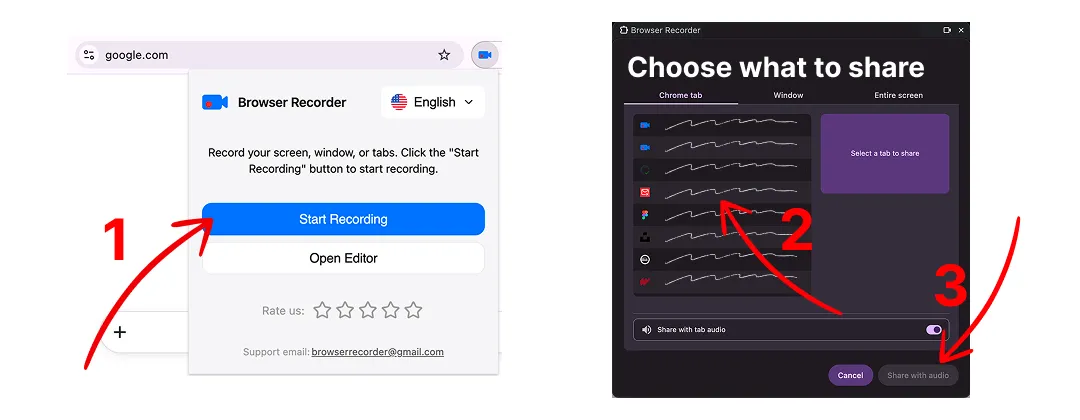
How to Record a Chrome Tab With Audio
Record any browser tab together with its sound and your microphone, then save it as a video file. No account, no watermark, no time limit.
How to Record Screen With Audio
How to record screen with audio straight from the browser: no desktop install, no account, no upload. Here is what that trade-off actually costs you.