Free Loom Alternatives in 2026: Browser Recorder vs Loom
Comparing Loom alternatives in 2026? Browser Recorder records locally with no five-minute cap and no watermark, free or $39 once. Here is how it stacks up.
Almost everyone hunting for a Loom alternative arrives with the same three complaints: the free plan stops at five minutes, the export carries someone else’s branding, and every recording lands on a server they do not control.
Browser Recorder fixes all three. It is a Chrome extension that records, edits and exports entirely on your machine. Loom is a video messaging platform that happens to include a recorder — and that single difference explains almost everything below.
The short answer
If you need a file, Browser Recorder is the better pick: unlimited recording length, no watermark, no account, and 1080p export on the free tier. The full editor and 4K/60fps export are a single $39 payment, not a monthly seat. If you need a link that plays instantly for a colleague, stay on Loom and pay for it. Most people searching for a replacement only ever needed the file.
What changed in 2026
The current crop of Loom competitors did not appear out of nowhere. Under Atlassian, the free Starter tier settled at 25 lifetime recordings per person, five minutes each, at 720p, with branding on the output. Then, in February 2026, the free “Creator Lite” seats that paid workspaces used to hand out disappeared — teams that had parked a dozen occasional recorders on free seats were moved onto Business billing at $18 per user per month ($15 annually).
For a twelve-person team, that is roughly $2,600 a year for people who record once a month. That bill is what most searches for an alternative to Loom are really about — and why the question is usually framed as finding a cheaper Loom alternative rather than a different feature set.
Browser Recorder vs Loom at a glance
| Browser Recorder | Loom | |
|---|---|---|
| Price | Free, or $39 once for Pro | Free tier, then $18/user/mo (Business), $24 (Business + AI) |
| Billing model | Pay once, keep it | Per-seat subscription |
| Recording length | Unlimited | 5 minutes on the free plan |
| Videos stored | Unlimited, on your disk | 25 per person on the free plan |
| Watermark / branding | None, on either tier | Loom branding on the free plan |
| Where video is processed | Locally, in your browser | Uploaded to the cloud |
| Max quality | 1080p/30fps free, 4K/60fps on Pro | 720p free, up to 4K on paid |
| Screen, mic and webcam | All three, free | All three |
| Editing | Trim and zoom free; cut and backgrounds on Pro | Trim free; waveform editing and stitching on Business |
| Captions | On-device AI subtitles (Pro) | Transcripts; AI summaries on paid |
| Share link | No, you get a file | Yes, core to the product |
| Viewer analytics, comments | No | Yes |
| Account required | No to record; Google sign-in for a Pro licence | Yes |
Loom pricing and limits as published on loom.com in July 2026. Browser Recorder plans are on the pricing page.
What a free Loom alternative actually has to do
Plenty of Loom alternatives call themselves free and then meter something else. Four questions separate a real replacement from a trial:
- Does the free tier have a recording length cap? Five, ten and fifteen minute ceilings are the standard trick.
- Does the export carry a watermark? Branding on a customer-facing demo makes the free tier unusable for the work you actually need it for.
- Is there a video count? A lifetime cap of 25 is a countdown, not a plan.
- Does it require an account before the first recording? That is a conversion funnel, not a feature.
Browser Recorder answers no, no, no and no. There is a paid tier — Pro, at $39 once — but it sits above a free tier that is genuinely usable on its own: unlimited length, unlimited recordings, no watermark, no account, 1080p export. Pro buys more editor, not permission to use what you already recorded.
No time limit, no watermark, no account
The five-minute ceiling is the limit people hit first, and it lands hardest on exactly the recordings that matter: product demos, onboarding walkthroughs, bug reproductions, lecture segments. Those run long by nature.
Record for as long as your disk allows, export to MP4, WebM, MOV or MKV, and hand the file to whoever needs it. The free tier exports 1080p at 30fps, which is already above Loom’s 720p free ceiling. Nothing is stamped on the output and nothing asks you to sign in first.
Worth stating plainly: this is not a cheaper clone of the same product. It is a recorder without the hosting platform attached. If a share link is the thing you are buying, no amount of local recording replaces that.
Where your recording actually goes
Every Loom recording travels to the vendor’s servers, gets processed there, and lives at a URL they control. That is what makes instant sharing possible, and it is also what rules the product out for anyone recording a customer account, an internal admin panel, or anything under an NDA.
Browser Recorder captures with Chrome’s own recording APIs, assembles the video locally, and saves it to your downloads folder. There is no upload step, because there is no server to upload to. For regulated teams that removes an entire vendor review from the process — the same reasoning we covered in how to record screen with audio in the browser.
The tradeoff is real: no upload also means no share link. You get a file, and you send it however you normally send files.
Audio: tab sound and microphone together
Both tools record your microphone. The difference shows up when the page itself makes noise.
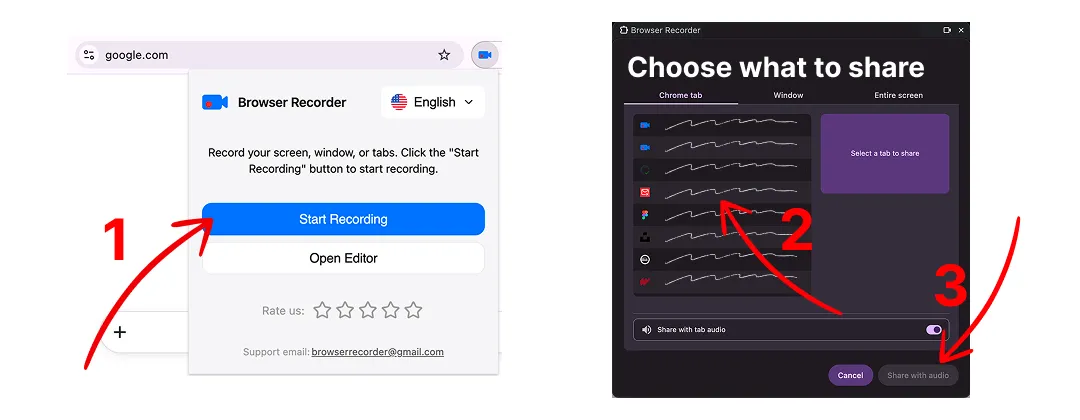
Browser Recorder treats tab audio and microphone as two independent switches. Record a video playing in the tab with commentary over it, record only your voice for a talking-head clip, or record only the tab when you are archiving something that plays sound. The tab recording walkthrough covers the mixing options in detail.
Loom captures system and mic audio too — but narrated walkthroughs are precisely the recordings that run past five minutes, so the free tier’s ceiling bites hardest here.
Editing, captions and export
Loom’s free plan gives you trimming and little else. Waveform editing, stitching and custom thumbnails sit behind Business, and filler-word removal behind Business + AI.
Browser Recorder splits its editor differently — not by month, but once.
Free, forever:
- Trim — cut the dead air off both ends.
- Smart zoom that follows your cursor, so a 1440p screen stays readable in a 720p viewport. Loom has no cursor-following zoom on any tier.
- Webcam recording alongside the screen and microphone.
- Export at 1080p, 30fps to MP4, WebM, MOV or MKV.
Pro, for a single $39 payment:
- Cut the timeline — remove the mistake in the middle, not just the ends.
- Custom backgrounds for demo clips that need to look deliberate.
- Subtitle generation run on-device with Whisper and burned into the export, so nothing is uploaded to a transcription service.
- Export at 4K, 60fps.
The comparison that matters is not free-versus-paid, it is once-versus-forever. Loom’s equivalent features are spread across Business and Business + AI, billed per seat, every month, for as long as you use them.
What Browser Recorder does not have is a multi-track timeline. Heavy post-production still belongs in a real editor.
What it costs over three years
Loom Business at the annual rate, against one Pro licence per person:
| People | Loom Business, 3 years | Browser Recorder Pro |
|---|---|---|
| 1 | $540 | $39, once |
| 5 | $2,700 | $195, once |
| 12 | $6,480 | $468, once |
| 30 | $16,200 | $1,170, once |
A single seat pays for a Pro licence back in under three months, and the free tier costs nothing at all if 1080p and trimming cover your work. One licence covers up to two computers on a single Google account.
If those Loom seats are buying hosting, analytics and a shared library, the spend is justified. If they are buying “a colleague occasionally records their screen,” it is not.
How to switch in five minutes
- Install the extension from the Chrome Web Store — no account, no onboarding.
- Pick your source: a tab, a window or the whole screen.
- Toggle tab audio and microphone independently.
- Record for as long as you need, then trim and zoom in the editor. Add Pro if you also want cuts, backgrounds, subtitles or 4K.
- Export the MP4 and send it the way you already send files — Slack, Drive, email, a bug ticket.
- Keep your Loom account on the free tier for the handful of recordings that genuinely need a hosted link.
Step six matters. Most teams do not need to migrate off anything; they need to stop paying seats for people who only ever needed a file.
When Loom is still the right answer
A comparison that only flatters one side is not useful. Stay on Loom when:
- Sharing is the point. Async standups, sales follow-ups and support replies live or die on a link that plays instantly in the recipient’s browser.
- You need to know who watched. View counts, completion data, comments and emoji reactions are platform features, not recorder features.
- The team needs a shared library. Spaces, folders and permissions across 50 people are the actual product.
- You record meetings. The meeting recorder and AI recaps have no equivalent here.
- You are not on Chrome. Loom runs as a desktop app and in other browsers.
Browser Recorder is a Chrome extension, and Chrome forbids extensions from
capturing
chrome://pages.
When Browser Recorder wins
- The recording is longer than five minutes. Product demos and lectures usually are.
- The video must not leave your machine. Compliance, client data, unreleased features.
- You need a file, not a link. Uploading to YouTube, dropping into Slides, handing to an editor, attaching to a bug report.
- You want zero setup. No account, no install beyond the extension, no seat to provision for a contractor who needs one recording.
- You would rather not rent software. Twelve people recording occasionally costs $2,160 a year on Business, forever. The equivalent here is nothing on the free tier, or $468 once if they all want the full editor.
How to judge the rest of the field
Loom alternatives divide on one question, and it is not price. It is where the video is processed.
Hosted tools upload your recording, render it on their servers and hand back a URL. You get instant sharing, viewer analytics and a team library. You also get per-seat monthly billing, a vendor holding your footage, and whatever limits that vendor decides its free tier needs next quarter. Swapping Loom for another hosted tool changes the invoice, not the model.
Local tools capture and render on your own machine and give you a file. No link, no analytics, no library — and no upload, no seat, no metered minutes. This is the group Browser Recorder is in.
That split also answers the question behind most searches for an open source alternative to Loom, or a self-hosted one. The usual goal is not the licence; it is recordings that never touch a server you do not own. Local recording gets you that outcome without running any server at all.
So before comparing feature tables, decide which half you are shopping in. If the hosted link is the product you want, keep paying for one. If it is the thing you are trying to get rid of, nothing hosted will satisfy you at any price.
Frequently asked questions
Is there a genuinely free alternative to Loom? Yes. Browser Recorder’s free tier records screen, microphone and webcam with no time limit, no video count and no watermark, and exports 1080p. The catch is that it produces files rather than hosted share links.
What does Browser Recorder charge for, then? One optional upgrade. Pro is a single $39 payment — no subscription — and adds timeline cutting, custom backgrounds, subtitle generation and 4K/60fps export. Recording length, watermark-free output and local processing are free either way. Current prices are on the pricing page.
What is the best free Loom alternative for long recordings? Anything that records locally, because there is no upload to meter and therefore no reason to cap the length. Browser Recorder’s free tier has no time limit and no video count, so a ninety-minute session is the same as a two-minute one.
Can I use a Loom alternative without creating an account? With Browser Recorder, yes: install the extension and record. Loom requires an account before your first recording.
Does Browser Recorder put a watermark on videos? No, on either tier — the free one included. Loom’s free plan applies its own branding, and removing it requires the Business plan.
Is there a Loom alternative that keeps recordings off the cloud? That is the core of this one. Capture, editing, captions and export all run in your browser, and the file is written straight to your downloads folder.
Is there an open source alternative to Loom? Open source options do exist, and Browser Recorder is not one of them. Worth asking what you want it for, though: most people searching for an open source or self-hosted alternative to Loom want recordings that never reach someone else’s server. Browser Recorder delivers that outcome directly — nothing is uploaded, so there is no server to self-host in the first place.
Can it record Google Meet or Zoom in the browser? It records any tab, including a browser-based call. Recording other people requires their consent, so check the rules that apply where you are before hitting record.
The short version
Loom sells a video platform, billed monthly, per person, forever. Browser Recorder is a recorder you pay for once, if at all. If your workflow ends with “send them the link,” pay for the platform. If it ends with “here’s the file,” you are renting infrastructure you never use.
Add Browser Recorder to Chrome and record something longer than five minutes.
Keep reading
How to Record a Chrome Tab With Audio
Record any browser tab together with its sound and your microphone, then save it as a video file. No account, no watermark, no time limit.
How to Record Screen With Audio
How to record screen with audio straight from the browser: no desktop install, no account, no upload. Here is what that trade-off actually costs you.